
Most people open DocCheck once, glance at a date, and close the tab. That wastes the tool. Used properly, it becomes the application organizer for your whole season. Here are seven ways to get real value out of it before the Fall 2027 deadlines arrive.
1. Settle the priority deadline question first
The most expensive misunderstanding in an application season is reading a deadline label wrong. A priority deadline is the date for best consideration and scholarship review; the final deadline is a hard stop. Programs at the same university can sit six weeks apart on those two labels. DocCheck prints each date with the exact label the program uses and counts down to each separately, which is the whole point of our priority deadline vs final deadline guide. Generate the checklist, and plan to the priority date.
2. Give recommenders a date, not a vibe
DocCheck lists recommendation letters as their own rows with the exact count the program requires. The sample tracker in the screenshot needs three letters. Ask early, then send each recommender the deadline from your checklist instead of a vague "sometime in December". Letters drift when dates are fuzzy.
3. Run one tracker per program
A spreadsheet with twelve tabs is where deadlines go to die. One DocCheck tracker per program keeps each program's dates and documents in the order you actually work on them. Start with the programs on our Fall 2027 MS Computer Science deadlines list if you are applying in CS, and generate a tracker for each.
4. Catch the December pinch early
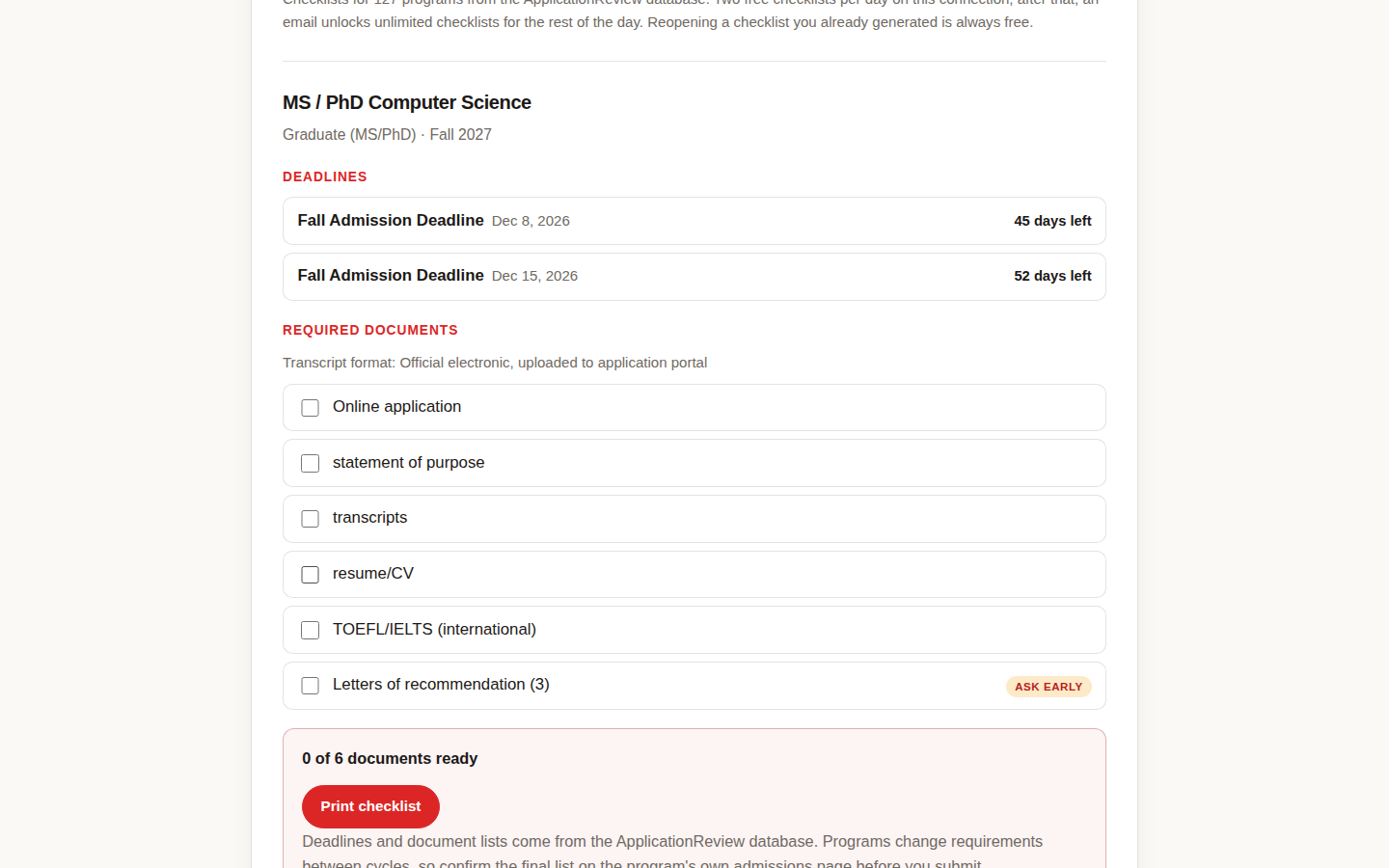
December deadlines stack. Our look at PhD application deadlines in December 2026 shows how crowded that month gets. If three of your programs land in the same fortnight, the countdowns on your checklists will show it months ahead, while you can still spread the work.
5. Treat rolling admission as an early deadline
Rolling programs read applications as they arrive until seats fill, so the real deadline is earlier than the published end of the window. A tracker with a live countdown keeps that honest: the date on the page is the last possible day, not the smart day. Generate the checklist the week you decide to apply, not the week you submit.
6. Print one copy for your folder
The print view turns the tracker into a clean paper checklist. Sounds old fashioned. Works anyway. Paper on the desk beats a tab you closed in September, and crossing off a document by hand is oddly motivating in November.
7. Reopen before you pay any fee
Before you pay an application fee, reopen the saved tracker and confirm every box is ticked and the transcript format matches what the program asks for: official electronic, uploaded to the portal, in the sample above. It takes two minutes and catches the one missing item that fees do not refund. Pair it with the checks in our completeness checker guide for a final pass.
One more habit worth building: while the checklists keep your documents straight, use the Application Budget Builder from ApplicationExperts to total what this season will cost in fees and tests, and theSOP Outline Builder when the essay rows on your checklist need a structure. Then go back to DocCheck and tick something off. Small ticks, whole season.
New to DocCheck? Start with the short explainer, then come back here and put it to work.