
Tracking documents is really tracking deadlines
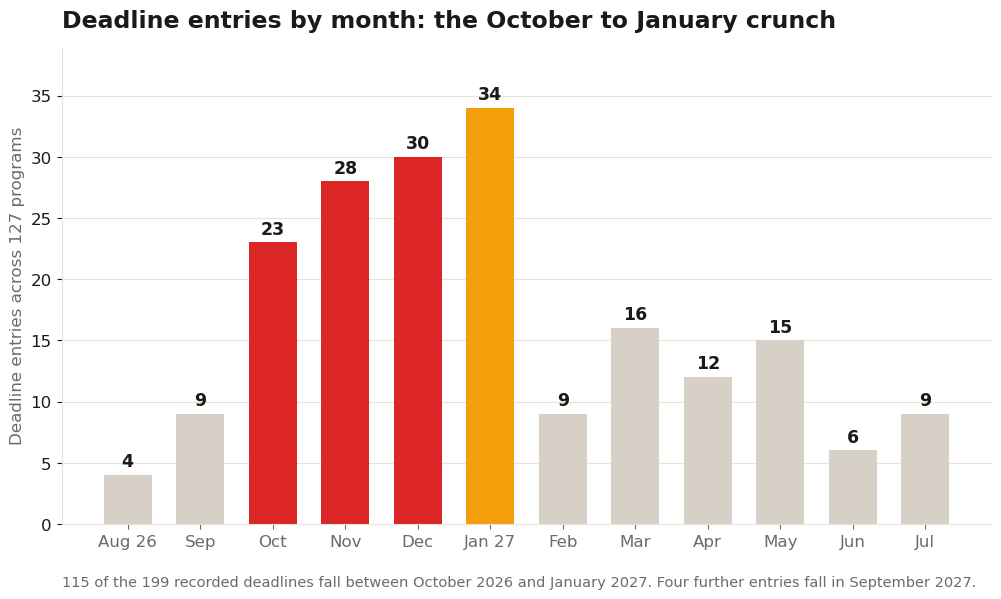
January is the peak, with 34 deadline entries. December is right behind at 30, November at 28, October at 23. Add your own list of eight to twelve programs and a typical applicant is staring at a deadline roughly every three days for a month.
The spring tail is real but thinner. March records 16 entries and May 15, mostly spring intakes and later rounds. An organizer that only handles one January pile and nothing after will strand the reapplicants and spring starters it should serve best.
Documents attach to those dates, not the other way round. A transcript is not done when you send it; it is done when the portal shows it received, which can lag your deadline by days. The apps below earn their place only if they track both clocks.
The buyer's checklist: eight things to score
1. Per program lists. Requirements differ by school. Generic checklists miss program specific items, and the miss surfaces in deadline week.
2. Receipt tracking. Submitted versus received, per document. This is the feature that prevents the silent disaster, and the one most apps skip.
3. Deadline types, labeled separately. Priority and final are different dates with different stakes. An organizer that stores one date per school is storing the wrong data model.

4. Recommender tracking. Who is writing, for which school, submitted or pending. Letters are the part of the file you cannot upload yourself.
5. Push alerts on a ladder. Fourteen day, three day and day of warnings. A single reminder the night before is a notification, not a system.
6. Offline access. Portals go down in January; your checklist should not. If the app needs a connection to show your own list, it will fail you at the worst moment.
7. Export. Share the status with parents or a counselor without handing over your phone. A clean export ends a lot of anxious phone calls.
8. A price model that fits a season. Applications run about four months. One time unlocks beat subscriptions for a tool you will retire in February.
What the organizer has to survive in January
Score each app against the eight, honestly, and most of the field thins fast. The two failures that matter are number 2 and number 3, receipt tracking and deadline types, because those are the two that prevent disasters rather than merely feeling organized. This is the standard we built DocCheck to: it generates your checklist program by program from recorded requirements, with each program's own deadline dates attached, so the tracker starts from what your schools actually ask for instead of a blank list you maintain by hand. Our college application organizer comparison scores the wider field against the same eight points, and the deadline tracker shortlist covers the alert focused tools.
Buy or build the system that tracks receipt, not just deadlines. In the October to January window the chart above describes, that single feature is the difference between a stressful season and a missed one.
One more January reality worth planning for: the season does not end in January. The same data records 16 deadline entries in March and 15 in May, spring intakes and later rounds that belong to reapplicants and second start applicants. A good organizer handles that tail without a second system, because the applicant who misses a January date in week one is very often the applicant targeting a March date in week six, with the same documents, the same recommenders and the same need for receipt tracking. Judge the app on the whole calendar, not just the peak, and it will still be working for you when the second chance deadlines arrive.
Sources: Common App